
WPlend reviews WordPress plugin and theme packages before making them available for download. Our quality assurance process is designed to confirm that the reviewed archive can be inspected, installed, activated, and used in a controlled WordPress environment without critical errors.
Each product page includes a Package Verification & Test Notes report for the specific version and archive tested by the WPlend QA Team.
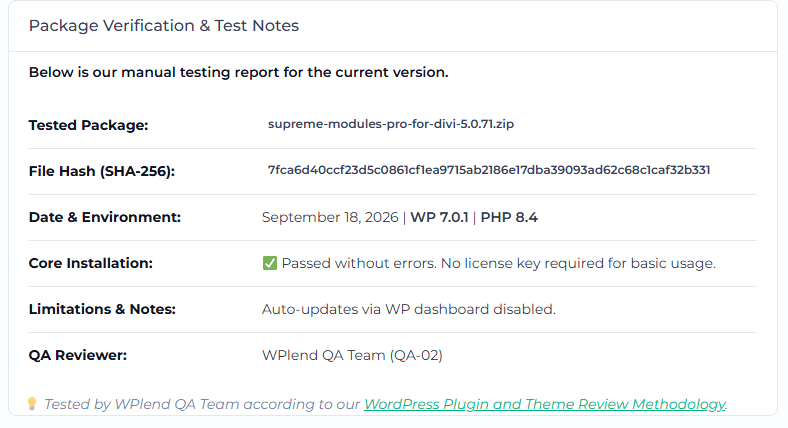
This methodology explains what we test, which tools and environments we use, how checksums are recorded, how limitations are documented, and how a package receives a 🟢Passed or 🔴Failed status.
Scope of the Review
Our review covers the downloadable package supplied for a specific product version. Depending on the product, testing may include:
- archive structure and file inspection;
- malware and suspicious-code scanning;
- WordPress installation and activation;
- basic administrative and front-end functionality;
- PHP and WordPress error monitoring;
- dependency and compatibility checks;
- update or replacement testing;
- documentation of licensing and update limitations;
- generation of a SHA-256 checksum.
The review is a practical package and compatibility assessment. It is not a complete source-code audit, penetration test, or guarantee that the software contains no undiscovered vulnerabilities.
1. Package Identification
Before testing begins, the QA reviewer records the package details:
- product name;
- product version;
- archive filename;
- archive size;
- date of review;
- package source available to WPlend;
- assigned QA reviewer or team identifier.
The archive filename and version are compared with the information contained in the plugin or theme files, including metadata such as:
- plugin or theme name;
- declared version;
- author information;
- text domain;
- minimum WordPress or PHP requirements, when provided;
- required plugins, parent themes, or other dependencies.
If the downloaded file is a bundle containing several installable packages, the bundle structure and required installation order are documented.
2. Archive Structure and File Inspection
The package is extracted in an isolated workspace and checked for basic structural integrity.
For plugins, we verify that the archive contains an identifiable plugin directory and a valid main plugin file with WordPress plugin headers.
For themes, we verify the presence of the required theme files and metadata, including style.css and the relevant template files. Child themes are checked for their declared parent-theme dependency.
The review also looks for:
- damaged or incomplete archives;
- unexpected nested ZIP files;
- executable or unrelated files;
- unusually obfuscated code;
- unexpected external downloaders;
- modified WordPress core files;
- files located outside the expected plugin or theme structure;
- package structures that prevent installation through WordPress.
Obfuscated or encoded code is not automatically treated as malicious, but unexplained or high-risk behavior may result in further review or a Failed status.
3. Security and Malware Analysis
Each package is scanned before installation. The analysis may combine:
- archive scanning with VirusTotal;
- local antivirus or malware scanning;
- inspection of suspicious PHP and JavaScript patterns;
- searches for unexpected remote requests or executable payloads;
- review of files flagged by automated tools.
Where available, the product page links to the VirusTotal report for the exact archive hash.
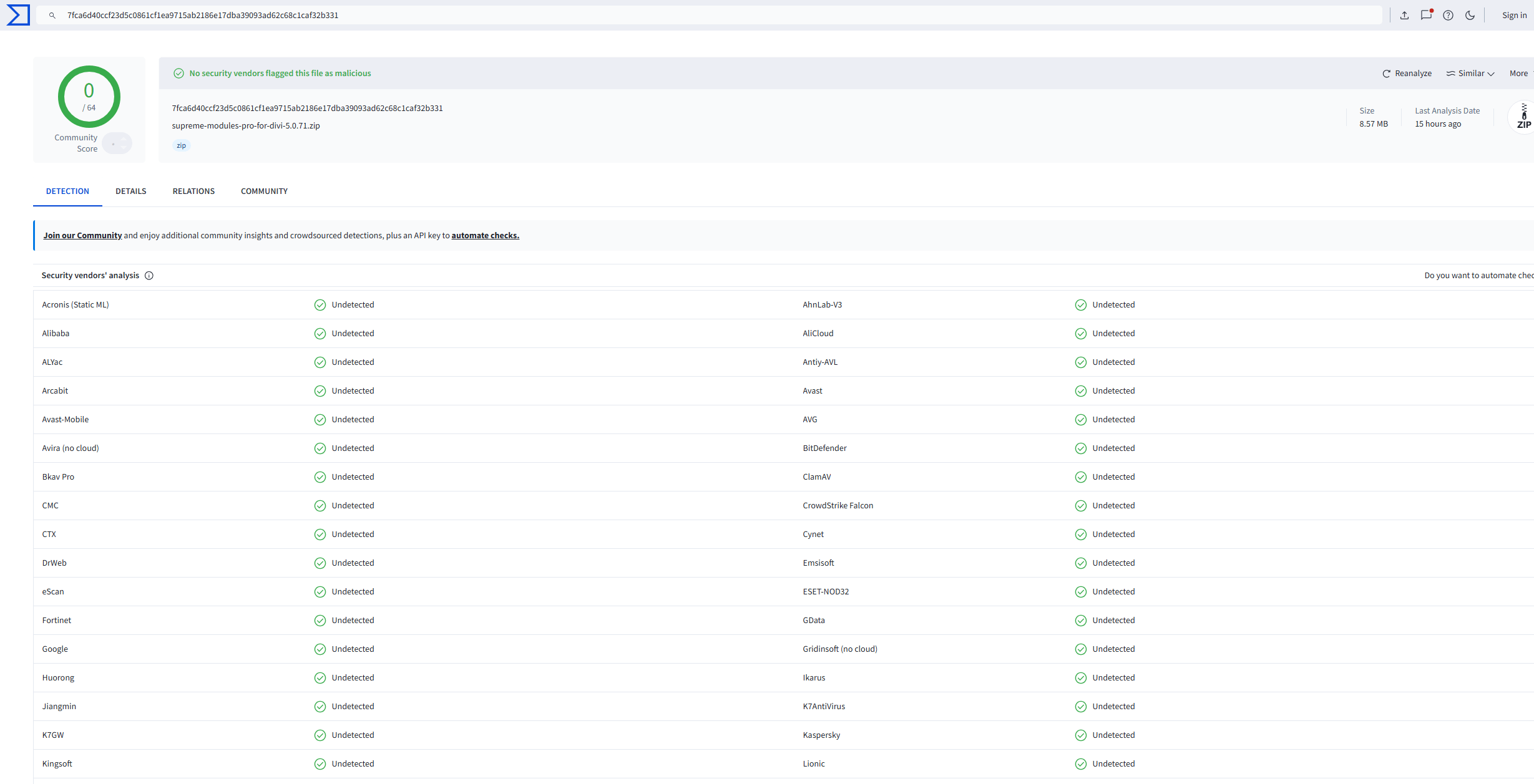
A “clean” scan means that the analysis tools used did not detect known malicious content at the time of testing. It does not guarantee that the package is free from every possible vulnerability, coding defect, or previously unknown threat.
A detection is reviewed in context because security scanners can produce false positives. Packages with unresolved malicious or materially suspicious behavior do not pass the review.
4. Checksum Verification
WPlend calculates a SHA-256 checksum for every tested archive. The checksum is displayed in the product’s Package Verification & Test Notes.
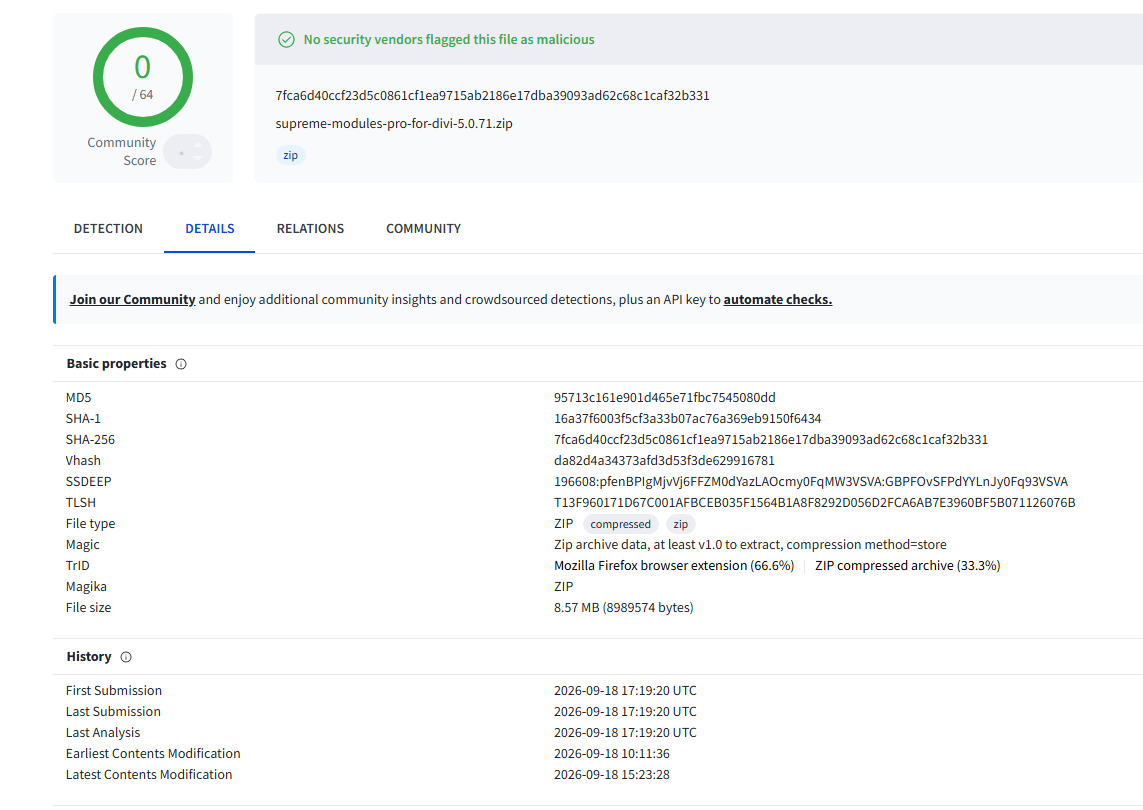
The checksum serves two purposes:
- it uniquely identifies the exact archive reviewed by the WPlend QA Team;
- it allows a downloaded file to be compared with the tested package.
Common checksum tools include:
sha256sumon Linux;shasum -a 256on macOS;Get-FileHash -Algorithm SHA256on Windows PowerShell.
Example:
sha256sum product-package.zip
The generated value should exactly match the SHA-256 value published on the product page.
A SHA-256 checksum confirms file identity and integrity relative to the tested archive. It does not independently prove authorship or package provenance. When an official developer checksum is publicly available, it may also be compared and the result documented separately.
Any change to the archive produces a different checksum. Therefore, repackaged or updated files require a new review and a new Package Verification & Test Notes report.
5. Test Environment
Testing is performed on a clean or resettable WordPress installation that is separated from the production WPlend website.
The exact environment used for an individual package is recorded on its product page. The configuration may include:
- WordPress version;
- PHP version;
- database server and version;
- web server;
- HTTPS;
- default or compatible WordPress theme;
- required parent theme;
- required free or premium dependencies;
- WordPress debugging settings;
- browser used for administrative and front-end checks.
A typical primary test configuration consists of:
- the current stable WordPress release;
- a currently supported PHP release;
- a clean database;
- standard WordPress configuration;
WP_DEBUGenabled during error monitoring;- no unrelated plugins active unless needed for compatibility testing.
If a product requires a specific builder, base plugin, parent theme, PHP extension, or third-party service, that dependency is installed and recorded in the test notes.
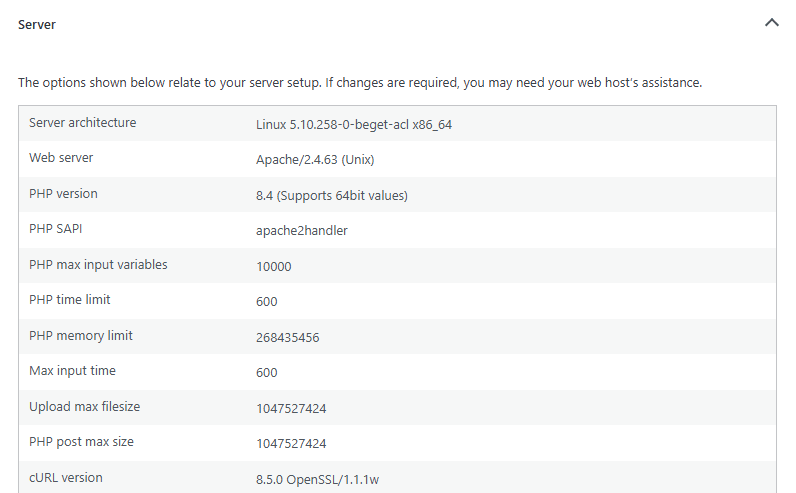
Testing in one environment cannot establish compatibility with every hosting provider, PHP version, WordPress configuration, browser, or combination of third-party extensions. The product report identifies the environment in which the stated result was obtained.
6. Installation and Activation Testing
The package is installed using the normal WordPress administration workflow whenever possible.
Plugin checks
For plugins, the QA reviewer checks whether the package:
- uploads through Plugins → Add New Plugin → Upload Plugin;
- installs without archive or filesystem errors;
- activates without a fatal PHP error;
- creates its expected settings, menus, or editor controls;
- loads relevant administration pages;
- performs its primary advertised function in a basic test;
- loads the tested front-end output where applicable;
- deactivates without a critical error.
Theme checks
For themes, the QA reviewer checks whether the package:
- uploads through Appearance → Themes → Add New → Upload Theme;
- installs without archive or filesystem errors;
- activates without a fatal PHP error;
- loads the front end;
- provides access to its expected theme settings or customization controls;
- renders basic WordPress content and templates;
- recognizes any required parent theme or companion plugin;
- does not generate critical errors during the tested workflow.
If the archive is a bundle rather than a directly installable ZIP file, the required extraction and installation steps are documented.
7. Functional Smoke Testing
After installation, the QA reviewer performs a limited functional smoke test focused on the product’s principal features.
Depending on the product, this may include:
- opening the settings interface;
- saving and reloading basic settings;
- creating a test page or post;
- adding a widget, block, shortcode, module, or template;
- rendering sample output on the front end;
- checking responsive or editor views;
- verifying that required assets load;
- confirming that key controls can be accessed;
- testing a representative workflow described by the product.
For large plugins and themes, the review does not test every option, template, module, integration, or possible configuration. The product report may identify the functions included in the smoke test.
Features that require a paid external account, private API credentials, license validation, remote service, special hardware, or third-party subscription may be recorded as not tested or not independently verified.
8. Error and Compatibility Monitoring
During installation and functional testing, the QA reviewer monitors the environment for critical problems.
The tools and sources used may include:
- WordPress Site Health;
- WordPress debug logging;
- PHP error logs;
- browser developer tools;
- browser console and network logs;
- Query Monitor, when appropriate;
- VirusTotal;
- local checksum utilities;
- manual source and file inspection.
We check for issues such as:
- PHP fatal errors;
- uncaught exceptions;
- activation failures;
- blank administration or front-end screens;
- repeated high-severity PHP warnings;
- failed JavaScript required for core functionality;
- missing required dependencies;
- blocked or broken primary workflows;
- unexpected remote requests;
- installation or filesystem errors.
Deprecation notices and non-critical warnings are evaluated according to their impact. They may be documented as limitations without causing the package to fail if the principal tested functionality remains operational.
9. How Limitations Are Recorded
Any relevant restriction discovered or confirmed during testing is added to the product’s Limitations & Notes field.
Examples include:
- automatic updates are unavailable;
- a developer license key is not included;
- manual updates are required;
- a free base plugin must be installed first;
- a parent theme is required;
- setup requires external API credentials;
- cloud templates or account-based services are unavailable;
- specific features were not included in the smoke test;
- a warning occurs without preventing core use;
- compatibility was confirmed only in the listed environment;
- an archive must be extracted before its components can be installed;
- developer support and developer-hosted services are not included.
Limitations must be written in factual language and must distinguish between:
- a confirmed defect;
- an expected product requirement;
- a redistribution-related restriction;
- an untested feature;
- an environment-specific observation.
Known limitations are not omitted merely because the package receives a Passed status.
10. Passed and Failed Status Criteria
🟢Passed
A package receives a Passed status when all mandatory checks relevant to the product have been completed and:
- the archive is readable and structurally valid;
- the package can be installed in the recorded environment;
- the plugin or theme can be activated;
- no unresolved malicious content is identified;
- no fatal error blocks the tested workflow;
- the primary tested functionality works as expected;
- required dependencies and relevant limitations are documented;
- the SHA-256 checksum has been recorded;
- the test date and environment are published.
A package may pass with documented limitations when those limitations do not prevent installation, activation, or the primary tested use case.
🔴Failed
A package receives a Failed status when one or more critical conditions apply, including:
- the archive is damaged, incomplete, or not installable;
- installation or activation causes a fatal error;
- unresolved malware or materially suspicious behavior is detected;
- the package does not match the stated product or version;
- the primary advertised functionality cannot be completed;
- a required dependency is missing and cannot be reasonably identified;
- the package makes unauthorized or unexplained changes to WordPress core files;
- a critical defect makes normal use unsafe or impractical;
- the package cannot be tested with sufficient confidence.
Failed packages are not presented as successfully tested. They may be withheld from publication until a corrected archive is obtained and reviewed.
11. Retesting After an Update
A test result applies only to the exact package version and SHA-256 checksum shown in the report. A previous version’s result is never automatically transferred to a new archive.
When a plugin or theme is updated, the WPlend QA Team:
- records the new version and archive filename;
- calculates a new SHA-256 checksum;
- scans the new archive;
- compares relevant package metadata and file changes;
- installs or replaces the previous version in a clean or controlled environment;
- checks activation and the primary functional workflow;
- monitors PHP, WordPress, and browser errors;
- reviews dependencies and previously documented limitations;
- records any new limitations or resolved issues;
- publishes a new test date, environment, checksum, and status.
If an update fixes a previously failed test, the package must complete the applicable review stages again before receiving a Passed status.
Where appropriate, the reviewer also checks whether existing settings or representative content remain available after a manual update. However, users should always back up their website and database before replacing a plugin or theme.
12. Understanding the Product Test Report
A product report may contain the following fields:
- Tested Package: Exact filename reviewed.
- File Hash (SHA-256): Identifier of the tested archive.
- Test Date: Date the review was completed.
- Environment: WordPress, PHP, and other relevant versions.
- Installation: Result of installation and activation testing.
- Functional Check: Principal workflow included in the smoke test.
- Security Scan: Link or summary for the tested archive.
- Limitations & Notes: Dependencies, unavailable services, warnings, or untested areas.
- Status: Passed or Failed according to this methodology.
- QA Reviewer: WPlend QA Team identifier responsible for recording the result.
Team Authorship and Accountability
Reviews may be attributed to the WPlend QA Team rather than an individual employee. An internal reviewer identifier may be displayed to support consistency and traceability.
Team attribution does not change the testing standard. Every published result must identify the package, checksum, date, environment, outcome, and relevant limitations.
Reporting an Issue
A package may behave differently because of hosting settings, another plugin or theme, a browser configuration, server restrictions, or a feature outside the documented test scope.
If you find an issue that is not covered by a product’s test report, please contact WPlend Support and provide:
- the product name and version;
- the downloaded archive’s SHA-256 checksum;
- your WordPress and PHP versions;
- the steps required to reproduce the issue;
- the exact error message or relevant log entry;
- details of active themes, plugins, and required dependencies.
We use reproducible reports to determine whether a package needs clarification, additional testing, or a revised status.