
💯 Tested and Working Product 🛡️ Clean & Secure 🔒 Safe & Secure Payments 📥 Instant Direct Downloads 🔄 Regular Product Updates
easy social share buttons-download

Easy Social Share Buttons 11.6.1

Version: 11.6.1 Update?
Updated: Sep 21, 2026 Archive Scan:Clean
Developer Website
View All Frequently Asked Questions
Genuine Release
100% genuine files directly from the developers. Licensed under the GNU GPL for an unlimited number of sites.
Technical Support
Professional help in solving any technical problems. Support is included in the price. Read the Support Policy.
Guarantees and Safety
100% safe & team-verified before publishing. Eligible for a 30-day refund in accordance with our Refund Policy.

Easy Social Share Buttons is a WordPress plugin designed to add social sharing, follow, and engagement tools to a website without relying on external services. It supports a wide range of social networks and allows precise control over how and where buttons appear.

The plugin is commonly used on content‑driven websites where social visibility and user interaction matter.

What this plugin does

✅ Adds social share buttons to posts and pages;
✅ Supports major and niche social networks;
✅ Includes follow buttons and profile links;
✅ Offers multiple button styles and layouts;
✅ Allows placement rules and display conditions;
✅ Works without third‑party APIs.

How it compares to basic share plugins

Unlike simple sharing plugins, Easy Social Share Buttons focuses on flexibility and placement control rather than just adding icons.

Feature Basic share plugins Easy Social Share Buttons
Number of networks Limited Extended
Display positions Few Many
Style customization Minimal Advanced
Follow buttons ❌ ✅
Analytics options ❌ ✅
Performance control Limited ✅

How it works

  1. The plugin is activated in WordPress;
  2. Social networks and button styles are selected;
  3. Display rules are defined per post type or page;
  4. Buttons are rendered automatically or via shortcodes;
  5. Settings can be adjusted without editing content.

No external accounts are required.

Design and layout control

  • Multiple predefined button styles;
  • Floating, inline, and popup placements;
  • Custom colors, sizes, and spacing;
  • Mobile‑specific display options.

Layouts can be adjusted to match the site design.
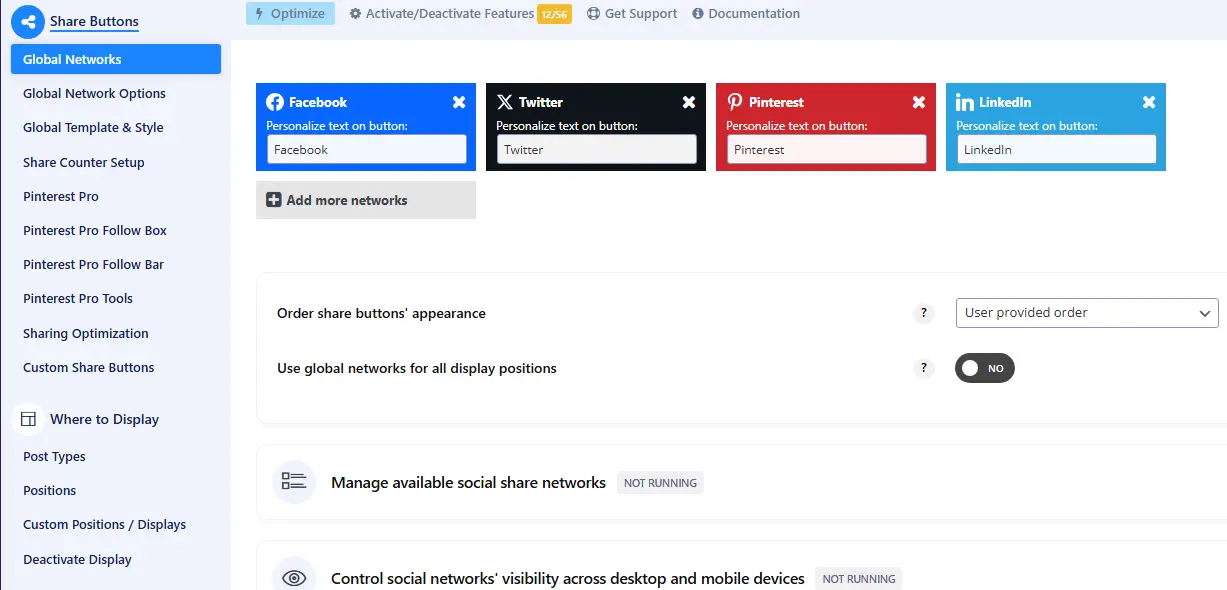
easy social share buttons admin

Common use cases

👍 Blogs and content websites;
👍 News and magazine sites;
👍 Marketing and landing pages;
👍 Affiliate and review websites;
👍 Corporate blogs.

Performance and site impact

The plugin is modular. Only selected networks and features are loaded, which helps reduce unnecessary requests. Performance mainly depends on how many buttons and animations are enabled.

Compatibility

  • WordPress 6.x;
  • All major themes;
  • Page builders including Elementor and WPBakery;
  • Caching and optimization plugins;
  • Multisite setups.

Frequently asked questions

No. Social sharing works without third‑party APIs.

Yes. Display rules allow fine‑grained control.

Yes. Mobile‑specific layouts and settings are included.

Yes, when configured with performance options in mind.

WPlend Team

All products undergo thorough moderation before being added to WPlend. We carefully check their functionality, features, compatibility, and performance quality to ensure our catalog contains only verified and up-to-date resources.

Package Verification & Test Notes

Below is our manual testing report for the current version.

Tested Package:codecanyon-6394476-easy-social-share-buttons-for-wordpress-11.6.1.zip
File Hash (SHA-256):e48fe3b1e6f7cf5e7ea5229fad95313d11ea62667da169a36b3841602d7f4de0
Date & Environment:September 21, 2026 | WP 7.0.1 | PHP 8.4
Core Installation:✅ Passed without errors. No license key required for basic usage.
Limitations & Notes:Auto-updates via WP dashboard disabled.
QA Reviewer:WPlend QA Team (QA-02)

💡 Tested by WPlend QA Team according to our WordPress Plugin and Theme Review Methodology.

Download Previous Versions

If you have purchased this product or hold an active membership, you can download previous versions as they are released.

Installing and Updating Plugins

  1. First Installation: Download the plugin's ZIP file from our website.
  2. In your WordPress dashboard, navigate to Plugins → Add New Plugin → Upload Plugin.
  3. Choose the ZIP file and click Install Now.
  4. Click Activate Plugin.
  5. Updating / Replacing: Navigate to Plugins → Add New Plugin → Upload Plugin.
  6. Choose the ZIP file of the new version and click Install Now.
  7. Click Replace current with uploaded (reactivate the plugin afterward if necessary).
Bundled packages: if a plugin is supplied as a bundle (core plugin + add-ons), extract the main archive first and install each component separately using its own ZIP file.
Free version dependencies: some PRO plugins (e.g. Elementor Pro, WooCommerce add-ons) require their base free version from wordpress.org to be installed and activated first.
File size limits: if WordPress throws an upload_max_filesize error, upload the unzipped folder via FTP to /wp-content/plugins/ (or /wp-content/themes/), or use a helper plugin like Easy Theme and Plugin Upgrades.