Happy Elementor Addons Pro is a WordPress plugin rather than a standalone theme. It extends Elementor with specialist widgets, motion effects, workflow tools, and site-building components. The package suits agency sites, landing pages, portfolios, editorial projects, and moderately complex WooCommerce stores where Elementor remains the primary layout layer.
Its practical advantage over many widget bundles is the mix of production tools and visual components. Cross-domain copy-paste, display conditions, presets, and selective asset loading are useful on repeat client builds, while the GSAP-based effects cover interactions that would otherwise require custom JavaScript.
Key capabilities
- Large widget set: the free and Pro editions collectively provide more than 150 widgets, including post grids, data tables, navigation components, carousels, charts, pricing elements, and WooCommerce widgets.
- Theme Builder: creates headers, footers, single-post layouts, and archive templates through Elementor, without requiring Elementor Pro for the core Theme Builder workflow.
- GSAP animation tooling: adds scroll triggers, sticky pinning, horizontal scrolling, text and image reveals, SVG drawing, morphing, and global element animation without hand-written timelines.
- Reusable design workflow: presets, hundreds of section and page templates, Live Copy, and cross-domain copy-paste reduce repetitive assembly across staging and production sites.
- Conditional output: widgets can be displayed according to factors such as browser, operating system, or time, which handles straightforward personalization without another visibility plugin.
- Third-party integrations: documented compatibility covers WooCommerce, Easy Digital Downloads, Mailchimp, Contact Form 7, Gravity Forms, Fluent Forms, and Ninja Forms.
- Modular loading: unused widgets can be disabled, while On Demand Asset Loading limits HappyAddons CSS and JavaScript to components used on the page.
Limitations: this is not a Gutenberg block suite and offers little value when a project is built primarily with the block editor. Elementor is still a dependency, and animation-heavy pages can become expensive on the main thread despite selective asset loading. Advanced faceted product filtering, checkout logic, multilingual workflows, and custom-field relationships still need dedicated plugins; official materials do not establish native ACF or WPML tooling.
Suitable projects and users
The plugin makes sense for freelancers and agencies maintaining an Elementor-based stack, especially when layouts are reused between domains. It also fits designers needing non-trivial motion without writing GSAP code. Lean brochure sites may use only a small part of the package, so enabling the entire widget inventory would be unnecessary.
Setup and technical approach
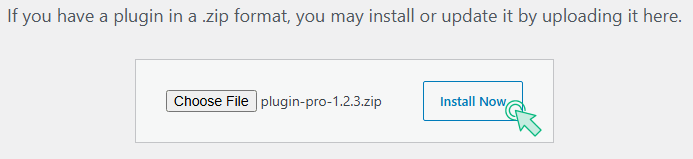
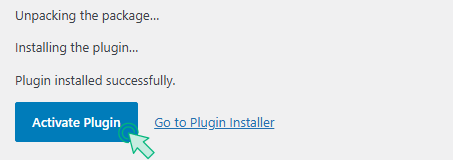
Install Elementor and the free HappyAddons base plugin, then add and activate the Pro package. Widgets and extensions are configured through the WordPress dashboard and Elementor’s Content, Style, and Advanced controls. Templates are imported from inside the Elementor editing workflow.
There is no conventional theme-options panel or Customizer layer because HappyAddons Pro is a plugin. Headers and archives created with its Theme Builder are stored as Elementor templates with display conditions. A child theme is required only when the underlying theme needs PHP-level changes—for example, overriding header.php, footer.php, single.php, or archive.php. Editing HappyAddons plugin files is update-unsafe.
The codebase cannot be judged as universally lightweight: DOM depth depends on the selected widgets and Elementor containers. Selective widget activation and on-demand CSS/JS are sensible architectural choices, but GSAP, sliders, particles, and multiple animated components still add runtime weight and should be profiled per page.
FAQ
Does it work without Elementor?
No. HappyAddons is an extension for the Elementor page builder.
Is Elementor Pro required for Theme Builder?
No. The developer provides header, footer, single-post, and archive building without Elementor Pro.
Can assets for unused widgets be avoided?
Yes. Widgets can be selectively enabled, and On Demand Asset Loading loads HappyAddons assets for widgets used on the page.
Does it support WooCommerce?
Yes. WooCommerce compatibility and dedicated commerce widgets are documented.