
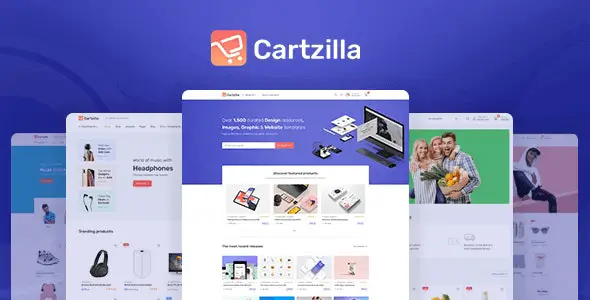
Cartzilla is built for stores that need more than a standard product grid. Its demo set covers digital marketplaces, grocery delivery, fashion, electronics and general retail, making it useful for agencies that regularly assemble WooCommerce sites in different niches. The visual system is based on the Cartzilla front-end design kit and Bootstrap, so navigation, product cards and checkout screens feel more application-like than those found in a typical multipurpose theme.
Key capabilities
- WooCommerce integration: provides styled catalog, product, cart, account and checkout templates rather than treating the shop plugin as an afterthought.
- Gutenberg-based page building: bundled Cartzilla blocks reproduce the main demo sections without locking ordinary page content inside a proprietary visual editor.
- Multi-vendor support: marketplace layouts are designed to work with Dokan, including vendor-oriented storefront and product presentation. Dokan itself supplies the seller dashboard and commission logic.
- Purpose-built shop demos: grocery, digital goods, fashion and electronics layouts include niche-specific headers, category navigation and merchandising patterns.
- Reusable static content: promotional sections and other repeated layout fragments can be managed separately instead of being copied across multiple pages.
- WPML compatibility: the theme can be used in multilingual stores, although translated products, strings and language management still depend on the relevant WPML components.
- One-click demo import: useful for establishing the expected page hierarchy and block configuration before replacing the sample catalog.
What it does not do: Cartzilla is not a standalone marketplace platform. Vendor registration, payouts and commission rules require Dokan or comparable third-party functionality. Advanced faceted search is also plugin territory. Stores with large catalogs should budget for indexed filtering, object caching and proper WooCommerce hosting. The Bootstrap-based UI and several commerce scripts make the default asset footprint broader than that of a stripped-down block theme.
Suitable projects and users
The theme makes sense for WooCommerce freelancers, catalog developers and agencies that want an established commerce interface without designing every account screen and product component from scratch. It is particularly practical for medium-sized grocery catalogs, downloadable product stores and multi-vendor prototypes. A small brochure site or an aggressively performance-budgeted headless build would gain little from its commerce-heavy stack.
Setup and customization
Installation follows the conventional theme-plus-companion-plugin model. After activating the required plugins, demo data can be imported and pages edited with Gutenberg and Cartzilla’s own blocks. Global presentation settings are handled through the theme options and WordPress customization controls; content-level changes remain inside the block editor.
Routine work such as colors, typography, catalog behavior and header variants should not require direct file edits. Structural changes belong in the supplied child theme. Developers can override WooCommerce templates under woocommerce/—for example content-product.php or single-product.php—rather than patching the parent package. Changes to header.php, archive output or custom hooks should follow the same child-theme approach so updates remain deployable.
The codebase follows familiar WordPress and WooCommerce conventions, which keeps hook-level customization manageable. It is not a minimal theme, however: Bootstrap components, block styles and shop interaction scripts add CSS and JavaScript that may be unused on simpler pages. Production builds benefit from page caching, image optimization and selective asset unloading after compatibility testing.
FAQ
Does Cartzilla create a multi-vendor marketplace by itself?
No. The theme provides the presentation layer; Dokan handles vendor accounts and marketplace operations.
Is Elementor required?
No. The primary demo-building workflow uses Gutenberg and the bundled Cartzilla blocks.
Can the parent theme files be edited safely?
Direct edits work but will be overwritten by updates. Template changes should be placed in a child theme.
Does it support multilingual shops?
Yes, Cartzilla is WPML-compatible. WPML plugins and translation work are still required.
Reviews
There are no reviews yet.