
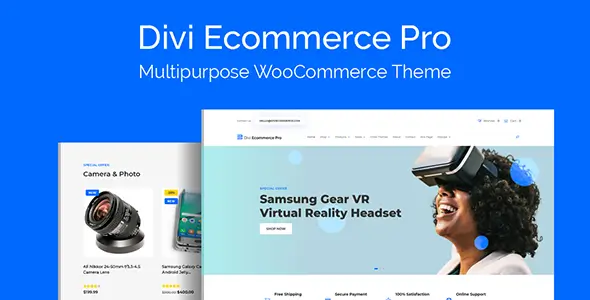
Deploying a WooCommerce storefront on top of Divi usually involves hours of wrestling with module spacing, mobile breakpoints, and generic product loop styling. Divi Ecommerce Pro acts as a structural shortcut for developers and agencies looking to skip the boilerplate phase. Instead of starting with a blank canvas, this child theme provides a pre-configured architecture tailored specifically for retail, digital goods, and service-based catalogs. It resolves a common pain point by properly styling standard WooCommerce endpoints—something vanilla Divi often leaves looking unpolished.
Core Capabilities & Integrations
This package goes beyond a simple UI kit by hooking directly into WooCommerce templates using the Divi Theme Builder architecture.
- Native Divi 4.x Integration: Fully utilizes the Theme Builder for dynamic content mapping, with official Divi 5 compatibility on the immediate roadmap.
- Pre-styled WooCommerce Endpoints: Out-of-the-box designs for the Cart, Checkout, and My Account pages, bypassing the need to write custom CSS overrides for Woo shortcodes.
- Advanced Cart UI: Implements a persistent sticky cart button and a slide-in cart drawer to reduce checkout friction and cart abandonment.
- Sales & Promo Mechanics: Bundles conversion-focused modules including styled countdown timers, customizable sale badges, and 4 specific offer layouts.
- Third-party Integrations: Features pre-mapped styling for Wishlist and Product Quick View plugins to keep DOM rendering and design language consistent.
- Template Modularity: Includes over 20 customizable layouts, featuring 3 distinct product page structures and 2 purpose-built popup designs.
Known Limitations: Divi Ecommerce Pro inherits the structural realities of the Divi ecosystem. The DOM output can get quite deep due to wrapper elements. For massive multi-vendor marketplaces or stores requiring complex faceted AJAX filtering, this child theme might introduce performance bottlenecks. It is best suited for small to medium catalogs rather than heavy enterprise deployments.
Deployment Scenarios
Agencies cranking out boutique e-commerce builds, local business storefronts, or digital download hubs get the highest ROI here. If a client demands a highly visual, drag-and-drop backend for future edits, pairing this child theme with WooCommerce hits the sweet spot between rapid deployment and client-friendly maintenance.
Setup & Architecture
Installation follows the standard WordPress child theme workflow. After activating the parent Divi theme, deploying Divi Ecommerce Pro requires importing the packaged demo data to populate the custom layouts into the Divi Library. From there, developers assign the Theme Builder templates to their respective Woo conditions.
Under the hood, customization remains developer-friendly. Minor visual tweaks are handled via the WordPress Customizer and Divi Theme Options. However, for deep structural changes, developers will need to rely on standard template overrides. Because it is a properly structured child theme, you can safely override core files like header.php, footer.php, or WooCommerce-specific templates (e.g., archive-product.php or single-product.php) directly in the child theme folder without losing changes during updates. Regarding asset management, the theme keeps additional bloat reasonably low by repurposing native Divi modules rather than enqueuing heavy standalone JS libraries, though the baseline Divi CSS/JS payload remains unchanged.
Technical FAQ
Does this theme require the standalone Divi Builder plugin or the Divi Theme?
It requires the parent Divi Theme to be installed and active. It operates as a child theme and will not function as a standalone product.
Is the codebase compatible with Divi 5?
Currently, the layout architecture is optimized for Divi 4.x. The developers have officially confirmed that Divi 5 compatibility is in development and will be rolled out soon.
Does it support custom popup triggers?
It includes two captivating popup designs meant for driving sales or growing mailing lists out-of-the-box. Advanced behavioral triggers may still require a dedicated popup plugin depending on campaign complexity.
Reviews
There are no reviews yet.