
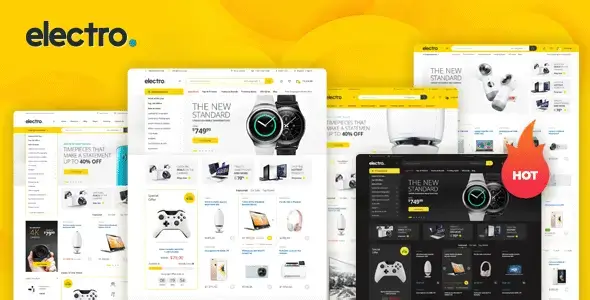
Electro is built for electronics retailers, component shops, appliance catalogs and affiliate-led product sites where specifications, categories and pricing need more room than editorial content. Its layout borrows from large online retailers: dense navigation, prominent search, product comparison and several merchandising blocks per page. That makes it more useful for a broad inventory than a minimalist boutique, although the resulting storefront is correspondingly heavier.
Key capabilities
- Deep WooCommerce integration: shop, category, product, cart and account views are restyled as a consistent electronics storefront rather than receiving a superficial CSS pass.
- Elementor and WPBakery workflows: supported page-builder content can be used for landing pages and home layouts. Gutenberg remains suitable for ordinary page and post content, but it does not replace every theme-specific layout control.
- Electro Extensions: companion functionality supplies the theme’s product carousels, deal sections, category blocks and other store-oriented components, keeping much of that logic outside the parent theme.
- Catalog merchandising: built-in layout patterns cover featured products, promotions, brands, deals and multi-column category navigation—useful when hundreds of SKUs must remain discoverable.
- Search and navigation tooling: the design accommodates product search, department menus and mega-menu-style navigation without forcing everything into a conventional WordPress menu bar.
- Plugin compatibility: the package is designed around WooCommerce and supports common additions such as YITH Compare, YITH Wishlist and WPML for multilingual deployments.
- Marketplace-ready presentation: compatibility options exist for multi-vendor plugins, though vendor commissions, withdrawals and moderation are still handled by the selected marketplace plugin.
What it does not do: Electro is not a headless commerce stack, ERP connector or marketplace engine. Complex faceted filtering, vendor management and product-data synchronization require third-party plugins or custom development. Its dense DOM, sliders and multiple catalog widgets can also become expensive on mobile when every module is enabled; caching, image sizing and selective asset unloading should be treated as deployment work, not optional polish.
Suitable projects and users
The theme fits WooCommerce stores with structured categories, comparable products and frequent promotions. Agencies can reuse its predefined shop patterns to ship electronics catalogs quickly, while developers retain access to WordPress hooks and template overrides. It is less convincing for a five-product brand site, content-heavy publication or store demanding a completely bespoke checkout experience.
Setup and customization model
Installation follows the usual parent-theme, child-theme and companion-plugin model. Demo import can establish menus, widgets and sample layouts, after which global styling, headers, shop behavior and catalog presentation are managed through the supplied theme options and WordPress controls. Builder-based sections remain editable in their original builder; switching builders does not automatically translate existing layouts.
Durable PHP changes belong in the included child theme. Small behavior changes should use hooks and filters in functions.php. Structural work may require overriding header.php, archive.php or relevant WooCommerce templates such as content-product.php inside the child theme. Direct edits to the parent theme or Electro Extensions will be lost during updates.
The codebase follows established WordPress and WooCommerce conventions, but “lightweight” would be misleading. Builder assets, Bootstrap-based presentation, sliders and commerce plugins produce a moderate-to-heavy CSS/JS payload. A restrained homepage, deferred non-critical scripts and page-level asset management produce better results than enabling every demo component.
FAQ
Is WooCommerce required?
Yes. Core catalog, product and checkout functionality comes from WooCommerce.
Can Elementor replace WPBakery on an imported WPBakery page?
No. Existing builder content must be rebuilt rather than converted automatically.
Should template files be edited in the parent theme?
No. Use the child theme so updates do not overwrite custom work.
Does Electro provide marketplace operations by itself?
No. A compatible multi-vendor plugin is required for vendor dashboards, commissions and payouts.
Reviews
There are no reviews yet.