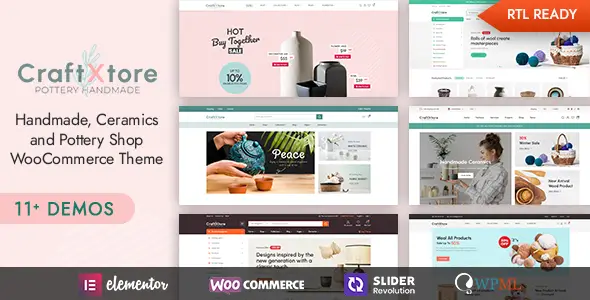
CraftXtore is built for ceramics studios, independent potters, craft workshops and home décor retailers that need a product-led WooCommerce storefront. Rather than stretching a generic retail skin across an artisan catalogue, it supplies layouts designed around large product photography, collections and maker-oriented editorial content. Eleven homepage demos, multiple shop grids and several product-page variants give agencies a useful head start without locking every project into the same composition.
Key Capabilities
- WooCommerce integration: provides styled catalogue, product, cart and checkout views, plus AJAX add-to-cart behaviour for a smoother purchasing flow.
- Elementor-based editing: landing pages and reusable visual sections can be assembled with the drag-and-drop builder instead of hard-coding each layout.
- Modular store layouts: includes two- to five-column grids, list views, full-width catalogues and left- or right-sidebar configurations.
- Product merchandising tools: supports quick view, countdowns, video thumbnails, variation swatches and multiple single-product arrangements.
- YITH compatibility: wishlist and product comparison features can be added through the corresponding YITH plugins.
- Multilingual workflow: advertised WPML compatibility makes it suitable for translated catalogues; Contact Form 7 and Mailchimp are also supported.
- Slider Revolution support: enables layered campaign banners and hero sliders, although simpler Elementor sections are usually lighter.
What it does not do: CraftXtore is not a native multivendor marketplace. Vendor dashboards, commissions and seller onboarding require a separate marketplace plugin and integration testing. It also does not provide ACF-driven catalogue modelling out of the box. Advanced faceted search or product filtering beyond the supplied shop UI may require a dedicated filtering plugin.
Suitable Projects and Users
The theme fits small and medium-sized pottery shops, curated craft catalogues, interior-accessory stores and studio websites combining commerce with process stories or journal content. Freelancers can deploy a demo and replace its content quickly, while agencies can reuse the available headers, product loops and page sections as a project scaffold. Very large catalogues should be performance-tested before launch, particularly when comparison, wishlist, sliders and live filters run together.
Setup and Technical Notes
Installation follows the usual WordPress theme workflow: activate CraftXtore, install WooCommerce and the recommended plugins, then import a selected demo. Pages are edited in Elementor, while global presentation settings are exposed through the theme’s Redux-powered options framework. The package advertises eight or more shop layouts, seven or more product layouts and six blog layouts.
Structural PHP changes belong in a child theme. Global template work may involve overriding header.php, footer.php or archive.php; WooCommerce-specific changes should use copied templates such as woocommerce/archive-product.php or woocommerce/single-product.php. Direct edits to the parent theme will be lost during updates. Header sections used by the demos are Elementor templates, so many visual changes will not require touching header.php.
The theme’s own CSS is distributed in minified files and split into base, Elementor and layout layers. That is reasonably maintainable, but the complete front end is not especially lean: Elementor, WooCommerce, Swiper, jQuery, icon fonts, YITH modules and optional Slider Revolution assets can generate a sizeable request stack. Unused plugins and widgets should be disabled, with page caching and asset unloading configured after the build.
FAQ
Which page builder does CraftXtore use?
Elementor is the documented visual builder.
Does it support multilingual stores?
Yes. WPML compatibility is listed by the developer.
Are wishlist and comparison tools included in the theme core?
They rely on compatible YITH Wishlist and YITH Compare plugins.
Can demo content be used as a starting point?
Yes. The package provides importable demos, including eleven homepage layouts.